doc:user:tutorials:installation
This is an old revision of the document!
Table of Contents
====== How to install Metafor? ======
Video
This video shows how to install Metafor on a PC running Windows.
<html> <iframe width=“853” height=“480” src=“//www.youtube.com/embed/14Wt2mst3B0” frameborder=“0” allowfullscreen></iframe> </html>
Download the installer
Installers are available on the eCampus website for the following platforms:
- Windows 7/8 x64
- Other Windows or Windows 7/8 x86
- Ubuntu
MacOS users: Please use a VirtualBox (ask for help).
Step-by-step Procedure
- Run the installer and follow the instructions.
- Install the Visual 2012 C++ runtime libraries if they are not present on your system.
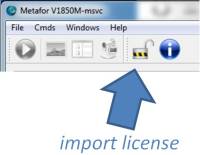
- Run Metafor (desktop link).
- Click on the padlock in order to import the license file (
metafor.lic). - Restart Metafor.
Where is Metafor?
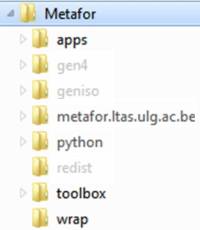
By default, all the files are located in C:\Program Files\Metafor
What is installed?
Have a quick look at the files installed in C:\Program Files\Metafor.
Metafor: Binary files (*.exe, *.dll, etc.).…/apps: Lots of examples (input files).…/metafor.ltas.ulg.ac.be: Offline documentation (html files).…/python: Local installation of python.…/toolbox: Python toolbox of Metafor.…/wrap: Python/C++ interface.
doc/user/tutorials/installation.1420623192.txt.gz · Last modified: (external edit)